



Chapter 5 — The Device and the Pipe
Fear the right thing, in the right order.
Last chapter was the software — the programs themselves. This chapter is the two things those programs ride on: the device in your hand, and the pipe it talks through to reach the world.
The principle
Your device is your position. Your pipe is your supply route. Both can be tapped — but most of what you have been told to fear about them is the wrong thing. The real skill here is triage.
The parallel — triage
Let me tell you something about the bomb-disposal trade that surprises people. The job is not mostly courage. It is mostly triage — ranking threats correctly, calmly, in order. A technician who treats every loose wire like a live detonator is not brave. He is useless. He will freeze on the harmless thing and have nothing left for the real one. The whole discipline is learning to spend your fear where it actually belongs.
The digital world has trained you to do the opposite. It hands you loud, dramatic warnings about threats that barely exist — and stays dead silent about the boring one that will actually get you. So we will do this chapter as triage. The device, then the pipe. For each, we separate the scary story from the real one.
The device — the scary story
Start with the device, and a warning you have probably heard: “juice jacking.” The story goes that if you plug your phone into a public USB charging port — an airport, a hotel lobby — a hidden attacker can siphon your data out through the cable. The FBI and the FCC have both put out warnings about it.
Here is the honest truth, and I will give it to you straight, because that is the deal between us: there are essentially no real-world cases of this ever happening to anyone. When reporters pressed the FBI on its warning, the Bureau said the post was a routine public-service announcement — not based on any actual threat it was tracking. Juice jacking has been demonstrated by researchers in a lab. It has not, as far as anyone can document, been done to a real person at a real airport. And your phone already defends itself: plug into anything, and it asks you first — trust this computer? Say no, and only electricity moves.
So put juice jacking near the bottom of your list. Real in theory. Vanishingly rare in life. (If you want the belt-and-suspenders fix, charge from a wall outlet instead of a USB port — but do not lose one minute of sleep over it.)
The device — the real one
The real device threat is quieter, and you invited it in yourself: the slow pile-up of connected things. The smart TV. The doorbell camera. The speaker that listens for its name. The thermostat. Every one of them is a small computer sitting on your network, and every one is another door. We will come back to this. For now, just notice that the pile is growing.
The pipe — the scary story
Now the pipe. The warning here is a classic: “never use public Wi-Fi — a hacker on the coffee-shop network will read everything you type.”
That was genuinely true once. It mostly is not anymore. Today the large majority of the web — well over eighty percent of it — is encrypted. When you see the little lock icon in your browser, it means a stranger sitting in that coffee shop cannot pull your password out of the air. The classic warning is old advice that the world quietly outgrew.
The pipe — the real one
But the threat did not vanish. It moved — and this is the part worth your attention. The danger on a network you do not control is no longer someone listening to you. It is someone being the network.
It is called an evil twin. An attacker stands up his own Wi-Fi hotspot and gives it a friendly, trustworthy name — “Airport_Free_WiFi,” “Hotel_Guest.” You connect. And now he is not eavesdropping on your traffic — he owns the road, and he can quietly walk you to a fake version of your bank’s login page, or your email’s. In 2024, a man was arrested for running exactly this con on commercial flights and in airports, with travelers connecting to his fake networks by the dozen.
So the rule for the pipe is not “never connect.” It is: on any network you do not control, assume the road itself may be a fake — and never, ever click past a security warning. When your browser throws up a warning that something is wrong with a site, that warning is the one thing standing between you and the fake page. The single most dangerous click in this whole chapter is the one that dismisses it.
A VPN — a service that hides which roads your traffic travels down — adds a layer of cover here, and it is worth having. But understand its limit: it hides your road; it does not stop you from walking willingly onto a fake one.
The pipe at home — the real, boring one
Which brings us to the one device-and-pipe threat that is real, common, documented, and almost entirely ignored: your home router.
Your router is the single gate every device in your house talks through. And by survey, about eighty-six percent of people have never once changed its administrator password from the factory default. That default is not a secret — it is printed in a manual, and the manuals are online. This is not a theoretical risk like juice jacking. Hijacked home routers and cheap cameras have been rounded up, by the hundreds of thousands, into some of the largest attacks the internet has ever seen. The boring gate that nobody guards is the one they actually walk through.
The system
That is the chapter. The device and the pipe are a genuine attack surface — but the system nobody taught you is triage. The loud threats — the airport charger, the coffee-shop sniffer — get the headlines and the fear. The quiet true one — the factory password on the box blinking in your hallway — gets ignored. An operator fixes the boring true thing, and stops paying rent on the loud false one.
Make it actionable
DRILL — THE DEVICE AND THE PIPE
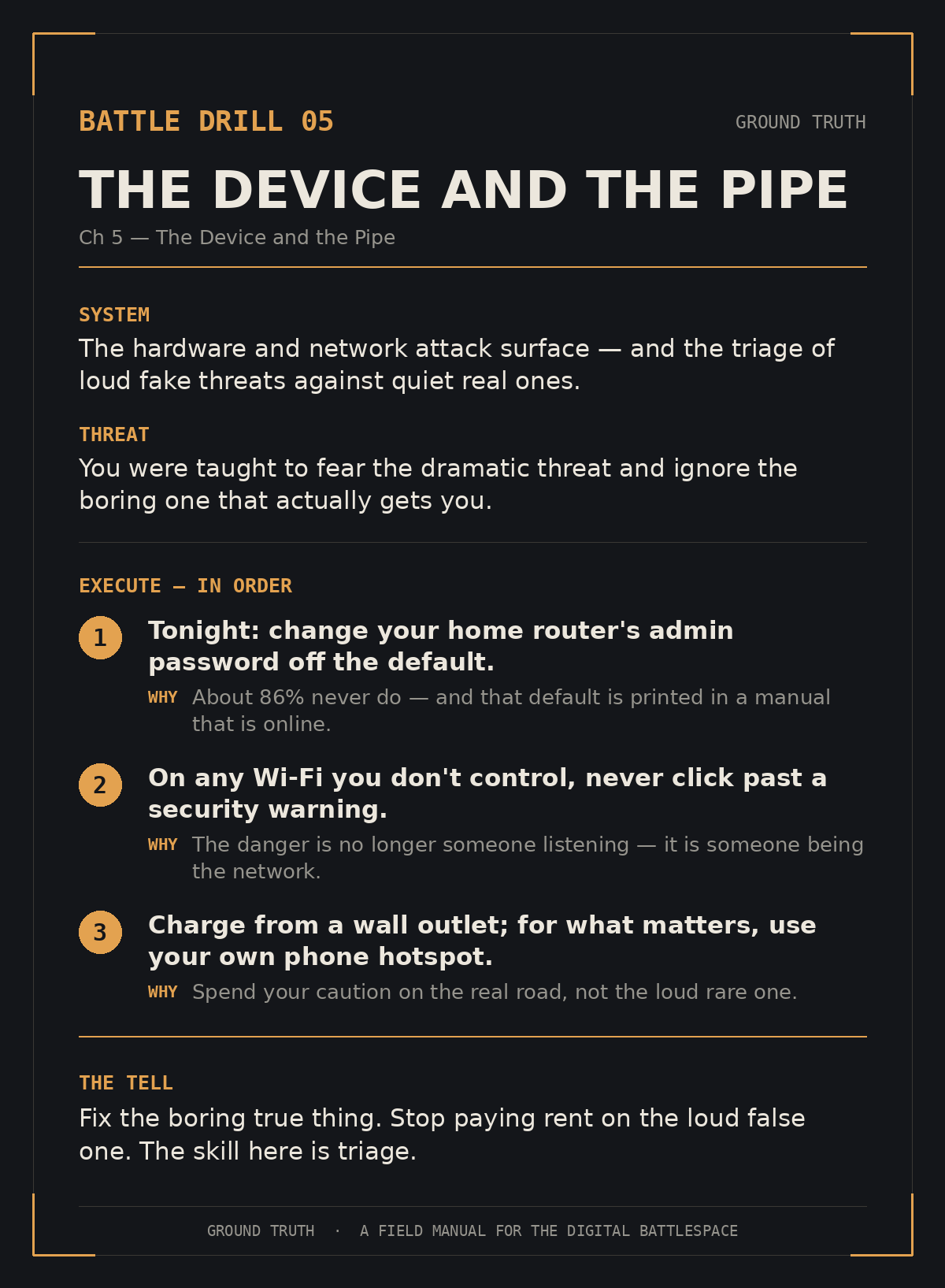
Device: When you can, charge from a wall outlet, not a public USB port. It costs nothing and ends the argument.
Pipe, away from home: On any Wi-Fi you do not control, never click past a browser security warning — that warning is the wall. For anything that matters, prefer your phone’s own cellular hotspot.
Pipe, at home — do this one tonight: Log in to your home router and change the administrator password from the factory default to something only you know. While you are in there, confirm its updates are turned on (you learned why last chapter). This is the highest-value ten minutes in the chapter.
Where this goes
You have now secured the supply line, the device, and the pipe. One thing is left — and it is the thing every attacker in this book would rather steal than anything else: the keys. That is next.